The crosshair is the one setting in CS2 you look at for every second of every round, and the settings pages for it are among the least explained on the internet. Most generators hand you a row of sliders and no sentence about what any of them changes. Most lists of “default values” disagree with each other, because they were copied from CS:GO-era pages rather than read from the game.
In the updates of 22 and 23 September 2026 the crosshair was rebuilt: new command names, new units, a longer list of styles. This is the crosshair explained command by command against the game's own console-variable table for the build that update produced — with the old numbers kept where they help you recognise a crosshair written before it, and clearly marked as old.
The 22–23 September 2026 Update: the Numbers Are Pixels
The new crosshair system arrived in the 22 September update; the notes published on 23 September explain it and add a few options. Valve's own announcement is the source for this section, and the wording below follows it rather than our own testing — nobody here has measured the new render in game.
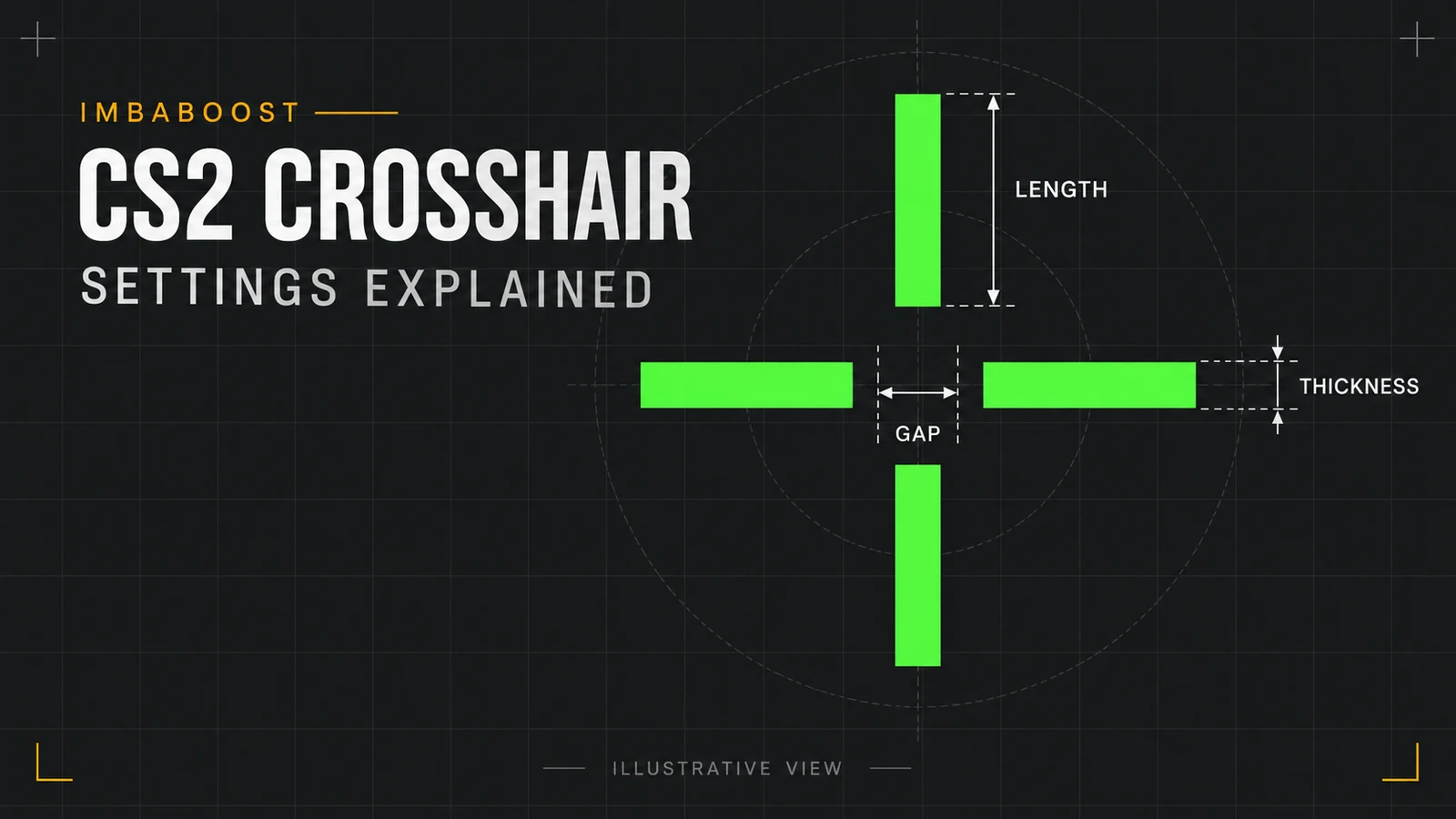
- Thickness and length are pixels. Valve's worked example:
thickness=1,length=8,gap=4is a crosshair one pixel thick, with eight-pixel bars and a four-pixel gap. - Change resolution and the game rescales them proportionally, so the crosshair keeps the same size on screen. Valve's example: thickness 2 px at 1280×720 becomes 4 px at 2560×1440. The game's own convar table adds only that length and thickness are “scaled with screen resolution”; the worked example is Valve's, and so is the promise that the crosshair stays proportional.
- A gap of 0 is respected. The notes list a fix for a gap of 0 being ignored.
- Half outlines were added — the top and left part of the outline only — and the outline setting now takes three values instead of two.
- A static square style was added to the style list.
- The notes also give the minimum distance a dynamic crosshair spreads to as 64 pixels.
One thing the notes do not say, and we will not either: whether a crosshair you set up before the update comes across unchanged, and what number it lands on if it does. That is a question for the game, not for a patch note, and we have not put it to the game.
Where the Crosshair Settings Live
In the game: Settings → Game → Crosshair. The preview at the top of that page is live, every change applies immediately, and nothing needs a restart. Each control on that page is a console variable, and the console is the other place to set them — which matters because a crosshair written as commands can be saved in an autoexec, pasted from a friend, or shared as text.
None of these commands requires sv_cheats. They are personal settings, they work in every mode including Premier and on third-party servers, and the game's own table marks every one of them archive per_user — kept per user, written back to disk.
The Defaults in the Current Build
Valve publishes the game's binaries; SteamDB's GameTracking project dumps every console variable from each build, with its default, its range and its help text. The list below is the dump for build 2000915 — the build the September updates produced — read on 24 September 2026:
cl_crosshairstyle— 7 (range 0–8)cl_crosshair_length— 8 (range 0–255)cl_crosshair_thickness— 2 (range 0–31)cl_crosshair_gap— 4 (range 0–128)cl_crosshair_drawoutline— 1 (range 0–2: no outline, full, half)cl_crosshaircolor_r0,cl_crosshaircolor_g255,cl_crosshaircolor_b0 — the default colour is greencl_crosshaircolor_a— 255 (range 0–255), described in the table as “crosshair opacity”cl_crosshairdot— 0,cl_crosshair_t— 0cl_crosshair_recoil— 1
Five commands that guides still quote are not in that table at all: cl_crosshairgap, cl_crosshaircolor, cl_crosshairusealpha, cl_crosshair_outlinethickness and cl_crosshairgap_useweaponvalue. Three more are in it but flagged hidden: cl_crosshairsize (still 3.9), cl_crosshairthickness (0.6) and cl_crosshairalpha (200). Hidden is the game's own flag on those rows, and it sits beside a full set of new commands that do the same jobs; what it means when you type one into the console is not something a dump of the game's files can answer. Treat those three as history rather than as a second way of doing it.
Those are also the numbers this article used to publish as current, and the reason to say so out loud: any page that gives you size 3.9, thickness 0.6 and gap −2.2 without a date on them is describing the game as it was before 22 September 2026. The pre-update defaults were unusual enough that the two biggest crosshair databases disagreed with the game and with each other — size 2.5 versus 5 against the game's 3.9 — and a list copied that carelessly does not survive a rebuild of the whole system.
What Each Command Actually Changes
cl_crosshair_length is the length of each bar, from the gap outwards, in pixels: 0 to 255, default 8. Its help text in the table adds that it is “scaled with screen resolution”.
cl_crosshair_thickness is how wide each bar is drawn, 0 to 31, default 2 — and the table's own note says the bars draw at a minimum of one pixel, so 0 is a legal value rather than a way to switch the bars off.
cl_crosshair_gap is an offset added to the distance between the centre and the bars, 0 to 128, default 4. It does not go negative: the command that did, cl_crosshairgap, is not in this build's table, and 0 is the tightest the new one goes. Per Valve's notes, a gap of 0 is now respected rather than ignored. The old per-weapon gap switch, cl_crosshairgap_useweaponvalue, is not in the table either.
cl_crosshairdot draws a dot at the exact centre. cl_crosshair_t hides the top bar, so nothing sits above the point you are aiming at — useful for headshots at range, disliked by people who find the asymmetry distracting.
cl_crosshair_drawoutline draws a dark border around the bars, and since the update it takes three values, in the game's own words: “0 = No outline, 1 = Full outline, 2 = Half outline”. This is the setting that decides whether a green crosshair vanishes against Mirage's bright walls. There is no separate outline-thickness command in this build's table.
cl_crosshaircolor_r, _g and _b are the colour, 0 to 255 each, and cl_crosshaircolor_a is the opacity, 0 to 255, described in the table as “0 = fully transparent, 255 = fully opaque”. The five-colour preset command and the separate transparency switch are both gone from the table, which means the colour is now always written as numbers.
cl_crosshair_recoil, on by default, is described in this build as “crosshair follows the weapon's predicted recoil (aim punch)” — the previous dump gave it no description at all, so this is the game's wording, finally, rather than the community's reading of it. Either way it does not change where the bullets go, only what the crosshair shows you.
Crosshair Styles: Nine Numbers, and a Renumbering
cl_crosshairstyle now takes a number from 0 to 8 and defaults to 7. The variable's own help text in the build 2000915 dump reads, word for word:
“Crosshair style. 0 = Dynamic Cross, 1 = Dynamic Circle, 2 = Dynamic Cross (Legacy), 3 = Static Circle, 4 = Static Cross, 5 = Static Cross (Shot Feedback), 6 = Dot Only, 7 = Dynamic Quad, 8 = Static Square. Styles 0, 1 and 7 track the weapon's actual inaccuracy.”
Two things follow. The first: the numbers were renumbered. Before the update the same variable ran 0 to 5 and its help text said “0 = DEFAULT (DISABLED), 1 = DEFAULT STATIC (DISABLED), 2 = DEFAULT (accurate recoil/spread feedback with a fixed inner part), 3 = ACCURATE DYNAMIC (DISABLED) (accurate recoil/spread feedback), 4 = DEFAULT STATIC, 5 = LEGACY (fake recoil - inaccurate feedback)”. So a settings list from earlier this month that tells you to run cl_crosshairstyle 4 was talking about “DEFAULT STATIC”, and in this build 4 is “Static Cross”. Close, and not the same claim.
The second: the dead numbers are gone. Three of the old six were marked DISABLED; none of the nine is. Beyond the names, the one behavioural sentence the table gives is the last one quoted above: 0, 1 and 7 track the weapon's actual inaccuracy. It does not say what the other six do, and we are not going to fill that in for it — one of them is called “Dynamic Cross (Legacy)” and another “Static Cross (Shot Feedback)”, so “the rest are frozen” is a sentence the table does not support. How any of the nine is drawn is a question for the game rather than for a table of variables. That is the part worth knowing before you copy a settings list from 2019, and the reason our generator offers all nine with the game's own wording beside each.
It is also why the generator's preview says what it is drawing. It draws the four bars your length, thickness and gap describe, which is the shape the four numbers the game calls a “Cross” are named after. For cl_crosshairstyle 6 — “Dot Only” in the game's own words — it draws no bars at all, and for the circle, quad and square numbers it tells you on the page that it is drawing bars and not their shape. A preview that silently drew a cross for every one of the nine would be inventing eight renderings.
If Your Crosshair Is Older Than the Update
A crosshair written before 22 September 2026 is a set of numbers in a scale the game no longer uses, and there is no honest arithmetic on this page that turns it into the new one. Two numbers that look perfectly ordinary — size 2, thickness 1, gap 0 — are legal on both sides of the update and mean different things on each, which is exactly why a converter cannot tell them apart by looking.
So our generator does not try. Anything it has not marked as saved in the new units is labelled pre-update and shown as it was saved rather than poured into the pixel sliders, and the four commands that depend on the unit — style, length, thickness and gap — are held back instead of being written from numbers in the old scale. One button moves that crosshair onto pixel units, and it says what it does: those four settings start from the current build's defaults, and the colour, the centre dot and the T style come with you, because they mean the same thing on both sides of the update. The rest you set once, in pixels, looking at the preview. It takes less time than arguing with a conversion nobody has checked.
What a Crosshair Code Is, and What It Is Not
A code looks like CSGO-xxxxx-xxxxx-xxxxx-xxxxx-xxxxx: the CSGO prefix, then five groups of five characters. CS2 kept the CS:GO format, which is why the prefix still says CSGO. To use one, go to the same Crosshair settings page, click Share or Import next to the preview, paste, and import. The same dialog copies your own crosshair out as a code.
Our generator writes console commands, not a code, and that is deliberate. An earlier version of this page told you the encoding “has been verified” on our side; we cannot stand behind that sentence, so it is gone. What we can say is what we do not have: no confirmation of the order of the fields inside a code against a pair the game itself produced, no list of which settings a code carries, and no test of what the September update did to codes made before it. A decoder built on top of that would swap gap and thickness in silence, and you would only find out in game. Commands are text you can read, check against this article, and paste into the console or an autoexec.
Does the Crosshair Change Where Bullets Go?
No. The crosshair is drawn over the game; the game does not read it. Bullets go where the weapon's spread and recoil send them, and a dynamic crosshair visualises that inaccuracy rather than causing it. A static crosshair hides it. Neither changes it.
What a crosshair does change is you: how fast your eye finds centre, whether the bars cover a head at long range, whether the colour disappears on a particular map. Those are real, they are personal, and they are the reason a pro's crosshair is a starting point rather than an answer.
Build Yours and Copy the Commands
The CS2 Crosshair Generator shows the crosshair on four backgrounds at once while you move the sliders, so you can see whether the gap you typed is the gap you wanted, and it prints eleven console commands underneath — the names and the bands of build 2000915, nothing the current table does not list. Start from one of six shapes, or look up what thirteen professional players had on the day we read their settings.
One honest note on the preview: CS2 draws the crosshair in its engine, at your resolution, with rounding nobody outside Valve has the code for. Every generator's preview is an approximation, ours included — ours at least prints the scale it is drawing at, in units of its own square, and says which part of the style it is not reproducing. The commands are exact, and they are what you paste.